
How to use
Open Getting started Getting started
Oyticker is organised in tabs, always one click away in the sidebar: Feed for the news, Domino for earnings nights, Charts for one market at a time and Sentiment for the market's mood, the Calendar, then your Watchlist, Discussions and Help. This page shows what stays around them on every screen.
The sidebar and the top strip

- TabsEvery section of Oyticker. The lit tab is the page you are on.
- Market hoursNew York, Europe and crypto: open, pre-market, after hours or closed, with the time left before the next open or close.
- Your planYour plan, or Upgrade to see what Plus and Pro add.
- Settings and profileYour username, picture, interface preferences and subscription.
- Market stripS&P 500 and Nasdaq ETFs, big stocks, euro, bitcoin, ether and gold, refreshed every 30 seconds. Point at one for its source and time.
- BellNews about what you follow in your Watchlist. Messages and mentions are counted on the Discussions tab instead.
- Account menuYour watchlist, your plan, settings and sign out.
- Collapse or pin the sidebar with the small button on its edge, a click on an empty part of it, or the [ key. Collapsed, it opens over the page when you rest the pointer on it.
- Tick, the mascot, sits at the top of the collapsed sidebar: click him, or right-click for his menu.
Notifications
The bell gathers the stories about the tickers, sectors and markets of your Watchlist, from the moment you follow them. The red number is how many you have not opened yet.
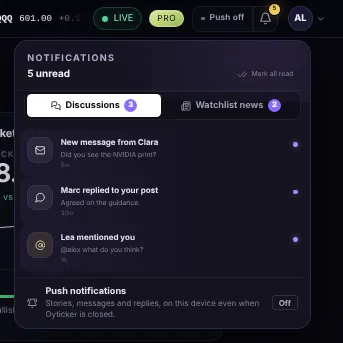
- Watchlist newsUp to 12 recent stories about what you follow, newest first. Click one to read it; it is marked as read.
- A storyIts title, the market it concerns with its tone, and how long ago it came out.
- Mark all readClears the red number at once.
Your account
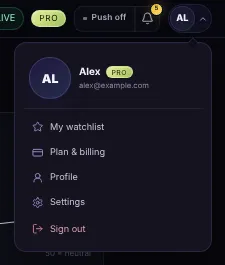
- YouYour username, your email, and your plan's badge (Plus or Pro).
- ShortcutsMy watchlist, your plan, Settings, and Sign out.
On your phone
On a phone or a tablet the sidebar gives way to a top bar: the menu, the logo, the bell and your account, with the row of tabs underneath. The bar slides away while you scroll down a page and comes back as soon as you scroll up.
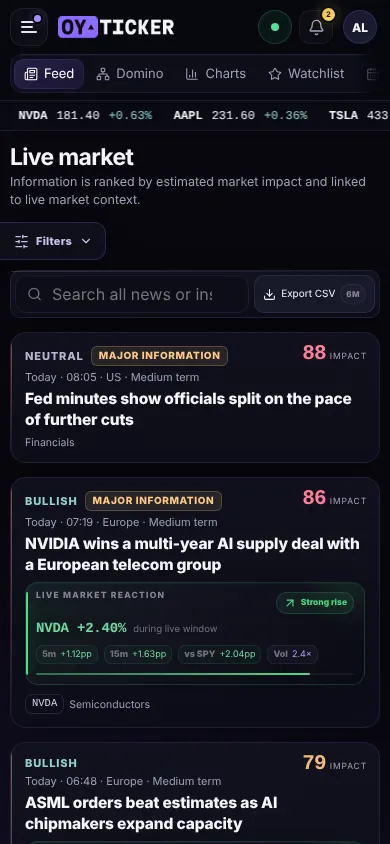
- MenuEvery tab in one list, with Plans, push notifications and the market hours.
- TabsSwipe the row sideways: the tab you are on stays in view.
- BellThe same watchlist news as on a computer.
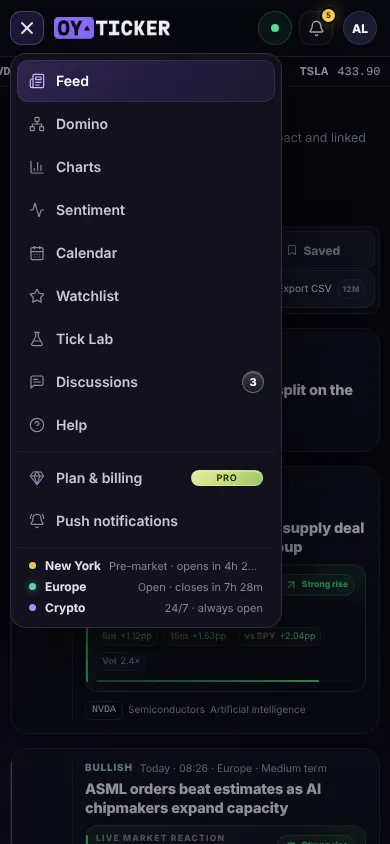
- Every tabThe tab you are on is lit; the number on Discussions counts what is unread.
- Push notificationsPlus and Pro alerts on this phone, once Oyticker is added to its Home Screen (the window explains how).
- Market hoursNew York, Europe and crypto: open or closed, and the time left before the next open or close.
Screenshots use simulated prices and stories.